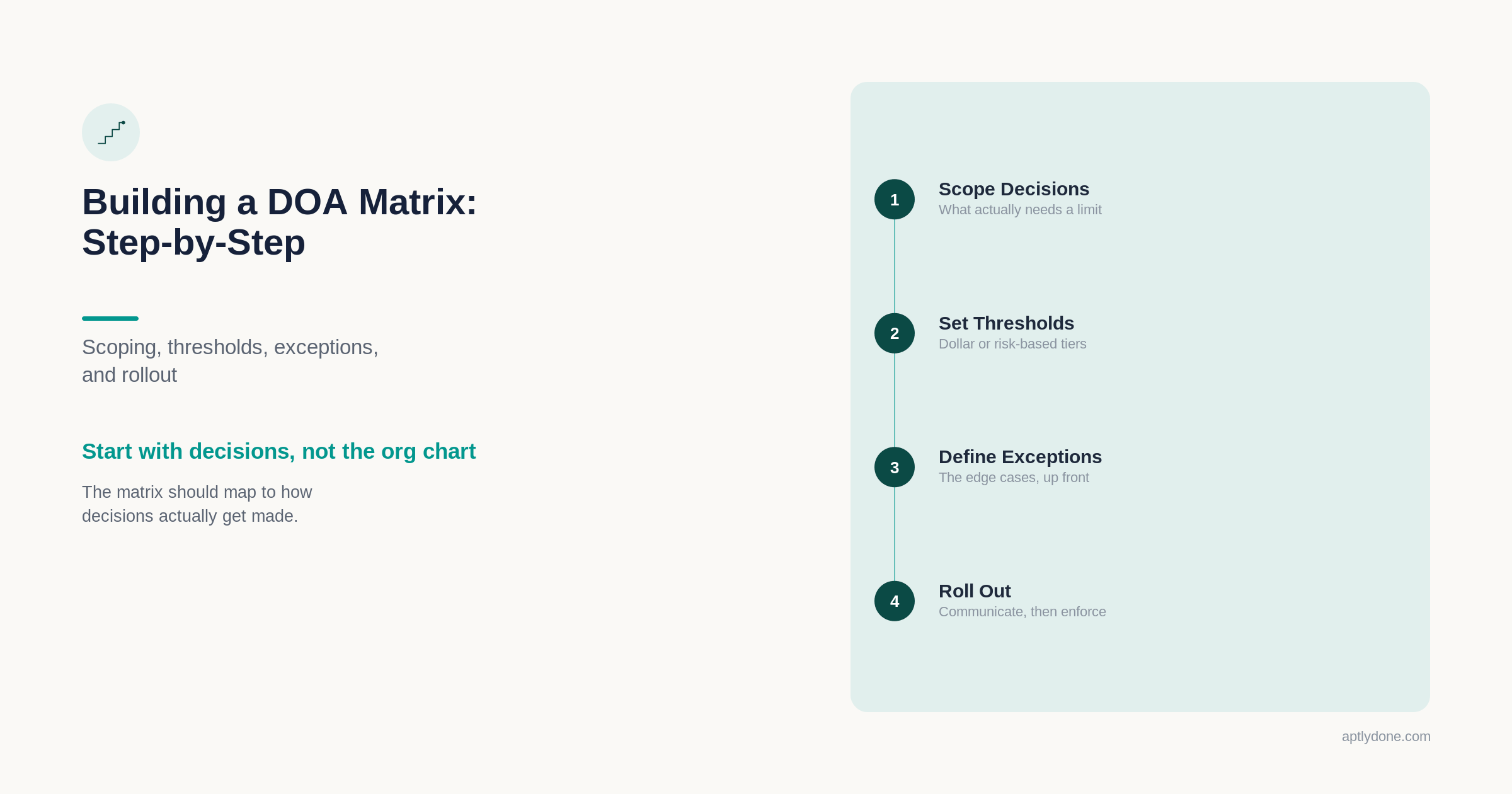
A clear, step-by-step approach for building (or rebuilding) a DOA matrix that teams actually use - including scoping, thresholds, exceptions, and rollout.
Definition: A delegation of authority (DOA) matrix is a structured governance document that maps decision types, approval thresholds, and conditions to the roles authorized to approve them — creating a deterministic, searchable rulebook for who can commit the organization to financial and operational obligations, under what constraints, and with what evidence requirements.
Most organizations have some form of authority matrix. A 2025 EY and Society for Corporate Governance study found that 90 percent of companies maintain a DOA policy, with 54 percent using a combined memo-and-matrix format. The problem is rarely absence — it's that the matrix was built once, filed in a shared drive, and quietly became disconnected from how people actually make decisions. McKinsey's global survey on decision-making found that ineffective decisions waste an estimated $250 million per year in labor costs at a typical Fortune 500 company — with managers spending 37 percent of their time on decisions and using 58 percent of that time ineffectively.
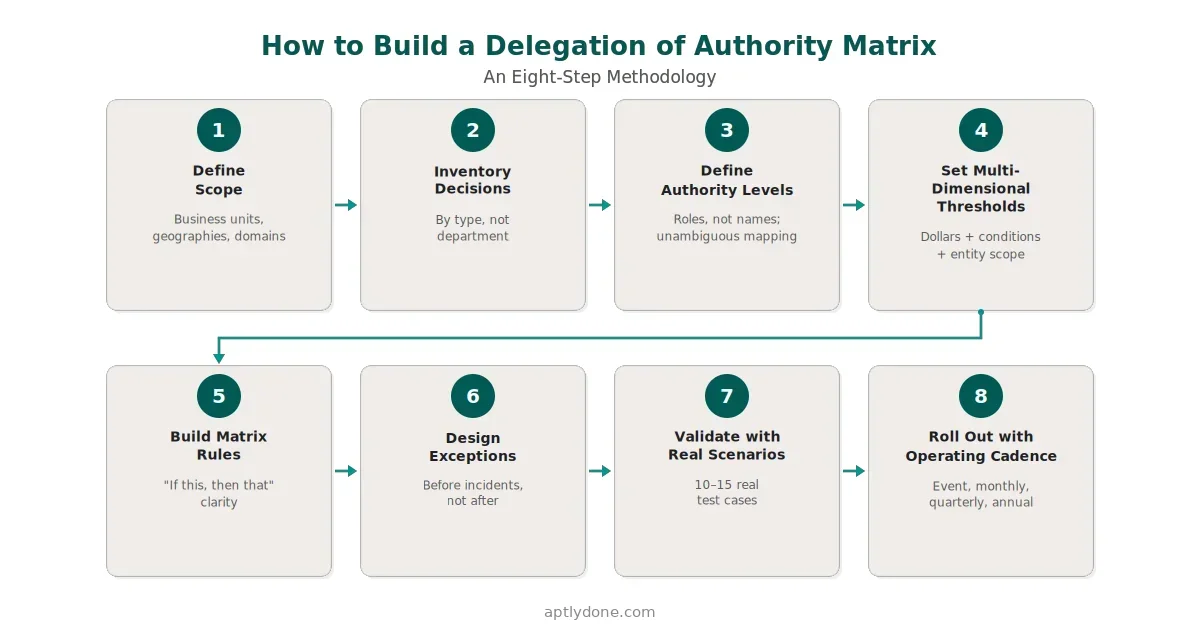
This guide walks through a practical, eight-step method for building or rebuilding a DOA matrix that teams actually use — covering scope, decision types, thresholds, conditions, exceptions, scenario testing, and the operating cadence that keeps authority current over time.
A delegation of authority matrix is a corporate governance document that defines which roles have decision-making power for specific business activities — including financial approvals, contract signing, hiring, and procurement — along with their monetary limits and conditions.
The matrix sits at the operational center of an organization's authority program. While a DOA policy establishes principles and governance philosophy, the matrix translates those principles into deterministic rules that people can apply in the moment. When someone asks "who needs to approve this?" — the matrix is where they should find the answer.
A well-designed matrix goes beyond simple dollar thresholds. It incorporates decision types, conditions (standard versus non-standard terms, new versus existing counterparties), entity scope, time constraints, and escalation paths. This multi-dimensional design is what separates a working governance tool from a static table that people ignore.
Organizations that lack a clear, enforceable authority matrix face compounding costs in speed, risk, and compliance. The data on this is unambiguous.
McKinsey calculated that the typical Fortune 500 company loses roughly 530,000 working days per year to ineffective decision-making. Bain & Company found that a single weekly executive committee meeting can cost an organization $15 million annually — and that roughly two-thirds of meetings end before participants can reach important decisions. When authority is unclear, decisions either stall (waiting for someone to claim ownership) or proceed without proper authorization (creating audit and compliance exposure).
The compliance dimension reinforces the urgency. The Ponemon Institute found that the average cost of non-compliance is $14.82 million, compared to $5.47 million for compliance — making non-compliance 2.71 times more expensive. SOX Sections 302 and 404 specifically require management to certify that effective internal controls exist over financial reporting, and delegation of authority is a foundational component of those controls. The UK Corporate Governance Code (Provision 29), effective January 2026, now requires boards to declare the effectiveness of material internal controls — further raising the stakes for organizations operating across jurisdictions. For a deeper look at what auditors need from your authority program, see DOA and SOX/Internal Controls (Q&A).
West Monroe's 2026 Speed Wins research quantified the opportunity cost: 73 percent of C-suite executives believe that cutting decision time in half could unlock at least 5 percent of revenue — with some estimating gains above 25 percent. For a $3 billion company, that translates to hundreds of millions in growth trapped in process. A well-structured DOA matrix doesn't just reduce risk — it accelerates the organization.
Scoping determines what your first version of the matrix will cover and — equally important — what it will not. Organizations that attempt to design every authority rule across the enterprise in a single pass rarely launch.
Decide on the boundaries across four dimensions: business units and geographies in scope, legal entities (especially for organizations with multiple subsidiaries), decision domains (finance, procurement, contracts, HR, IT, risk), and what is explicitly out of scope for phase one.
The EY/Society for Corporate Governance study confirmed the pattern: most organizations struggle to keep DOA policies current — often because the initial design was too ambitious and became unmaintainable.
Practical guidance: Start with the decision domain that causes the most operational pain. Contracts, procurement, and payments are the most common starting points because they touch multiple teams, have clear thresholds, and create audit evidence that leadership cares about. A matrix that covers one domain well and is adopted by real users within weeks is worth more than a comprehensive design that takes six months to approve.
The most effective matrices are organized around decision types — the kinds of commitments an organization makes — rather than departmental structures that change with every re-org.
Common high-impact decision types include vendor onboarding and contract execution, purchase commitments (POs, SOWs, subscriptions), invoice approvals and payment releases, discounts and write-offs, capital approvals and project change orders, and policy exceptions and risk acceptance.
McKinsey identifies four distinct categories of organizational decisions — big-bet, cross-cutting, delegated, and ad hoc — each requiring different governance approaches. A well-designed DOA matrix addresses all four by tailoring authority levels to decision type, risk, and frequency. Organizations that categorize decisions by type rather than department see faster execution, because authority rules become portable across teams rather than tied to organizational structures that shift.
Keep the initial list to 6–10 decision types. You can expand later. Organizations that try to cover 50 or more decision types in the initial matrix typically stall in committee review.
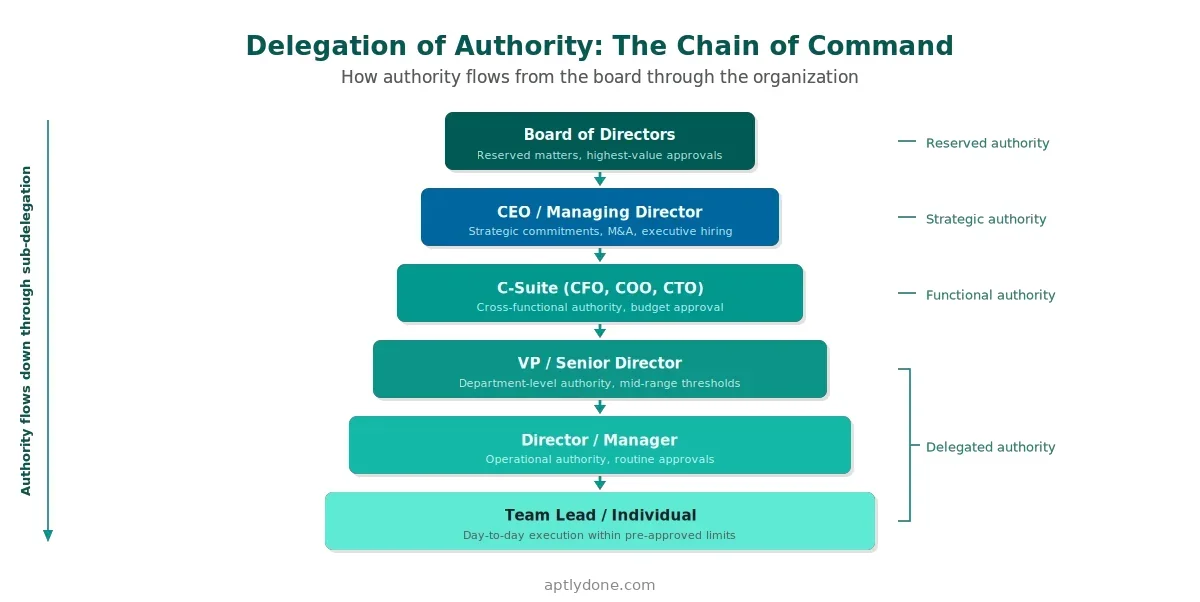
Authority levels should map to roles people recognize in daily operations — not to abstract titles that exist only in the governance documentation. A common approach is a tiered ladder (Manager → Director → VP → CFO → CEO) plus reserved authorities that remain with the Board or a specific committee.
Two principles that save significant time during implementation. First, use roles, not names. Names change constantly through promotions, transfers, and departures. Role-based authority survives organizational churn. Second, define what a role means in context — for example, "VP, Finance for Region X" rather than just "VP" — so the mapping is unambiguous when multiple people hold the same title across entities.
The EY study found that 36 percent of organizations cite insufficient training as their top DOA challenge. Ambiguous authority levels are a primary contributor: when people cannot determine whether they have authority for a given decision, they either escalate unnecessarily (slowing the organization) or proceed without proper authorization (creating risk).
Dollar limits are necessary but insufficient. Most real-world decisions require additional constraints to be properly governed. The threshold dimensions below separate effective matrices from basic ones that organizations outgrow within months.
This is where a DOA matrix becomes more than a spreadsheet. When conditions are explicit, the matrix can handle the real-world complexity that causes people to route around simpler governance tools. West Monroe's 2026 research found that 44 percent of managers have accepted slow decision-making as normal — a cultural inertia that well-structured matrices with clear conditions and thresholds can break by making authority rules self-service.
Each row in the matrix should read like a rule someone can execute without interpretation. A matrix that requires judgment calls on every decision will not scale and will not be followed consistently.
Here is a simplified example using representative data:
Notice how conditions change the approver and escalation path for the same decision type. This conditional logic is what makes the matrix usable for real scenarios. Without it, organizations end up with overly broad rules that either over-escalate routine decisions or under-control high-risk ones.
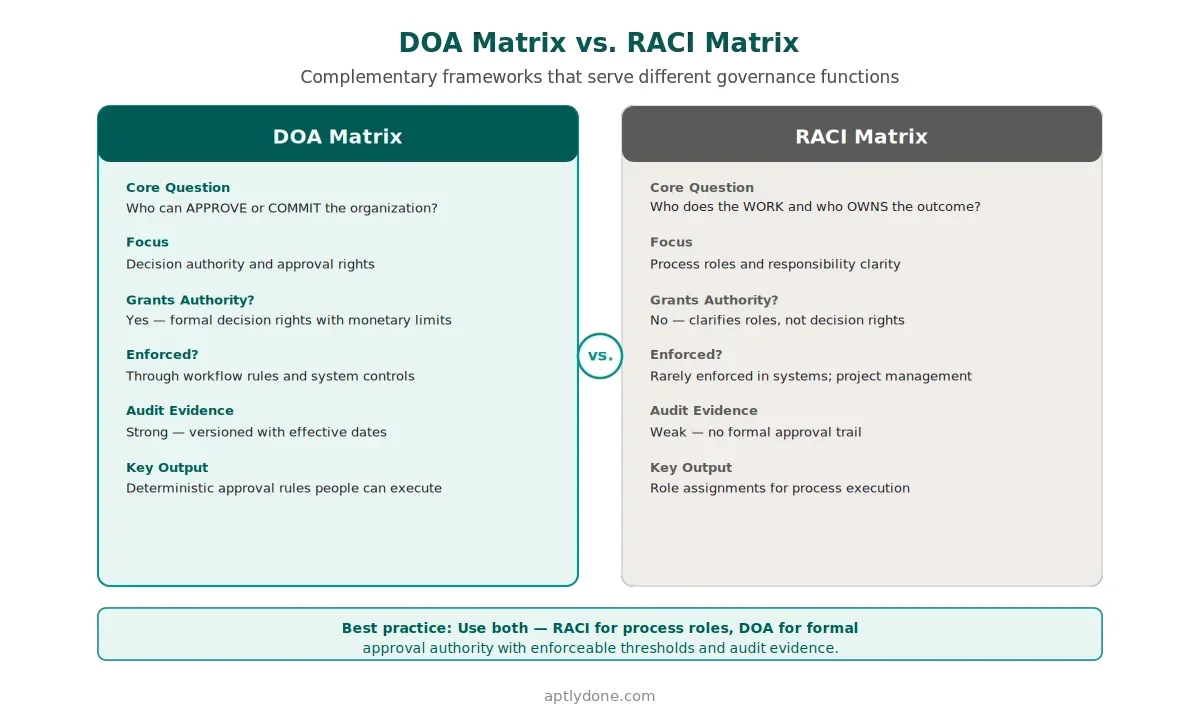
A DOA matrix defines who has the authority to approve or commit the organization to a decision. A RACI matrix clarifies who is Responsible, Accountable, Consulted, and Informed in a process. These frameworks are complementary but not interchangeable — and confusing them creates governance gaps.
You can be "Accountable" in a RACI chart and still lack the delegated authority to approve a transaction above a threshold. The DOA matrix fills that gap. For a detailed comparison of these frameworks, see DOA vs. Approval Matrix vs. RACI.
Every authority program encounters edge cases. The organizations that handle them well are the ones that designed the exception path before it was needed — not after the first incident.
Decide upfront: who can grant exceptions, how exceptions are documented (with what evidence), how long exceptions remain valid, and whether recurring exceptions trigger a permanent rule update after review.
Without a defined exception path, exceptions become shadow processes. Based on experience working with enterprise organizations, the top indicator of a failing authority program is not missing rules — it is an informal exception process that runs on email and verbal approvals with no audit trail. Harvard Business School research has shown that ambiguity about who has decision rights frequently carries a high cost for the organization — and exceptions without formal governance are the most common source of that ambiguity.
Before rollout, test the matrix against 10–15 real scenarios drawn from recent operational decisions. Good test cases include a contract renewal with a price increase, an urgent operational purchase outside normal procurement cycles, a new vendor with non-standard terms, a write-off request approaching a threshold boundary, and a temporary authority coverage situation for a planned absence.
If the matrix cannot handle these common scenarios cleanly — providing a clear, unambiguous answer for each — fix it now. This scenario testing phase is the difference between a matrix that teams adopt and one they route around. Bain & Company's research found that each person added beyond seven in a decision-making group reduces effectiveness by 10 percent. Matrix design should embed that principle: the right approver at the right level, not approval committees assembled for every decision.
A DOA matrix is a living governance system, not a document you finish. The organizations that maintain effective authority programs treat the matrix the way they treat financial controls: with defined ownership, regular review, and systematic updates.
A proven cadence includes event-based updates triggered by role changes, re-orgs, new entities, or bank account creation; monthly reconciliation of key authority mismatches (expired delegations, HR status gaps, workflow divergence); quarterly sampling to validate that approvals match matrix rules and evidence is complete; and annual recalibration of thresholds and policy principles aligned with business strategy and risk tolerance.
Deloitte's research on organizational decision-making found that unclear lines of authority for decision-making cause incremental poor choices to compound into profoundly negative outcomes. The operating cadence exists to prevent that compounding — catching drift early, when it is inexpensive to correct. For detailed metrics on what to track, see Authority Monitoring and Reporting Metrics.
Before considering the matrix "launched," confirm these elements are in place:
Designing the matrix in isolation from enforcement systems. If your ERP, procurement, or contract management workflows do not reflect the matrix rules, you have a document that describes intent but does not control outcomes. The matrix and workflow rules should be aligned from day one.
Using names instead of roles. Matrices that reference individuals rather than roles break with every promotion, transfer, or departure. Role-based design survives organizational change.
Ignoring non-financial authority. Hiring decisions, policy exceptions, risk acceptance, and IT access approvals all carry organizational impact. A matrix limited to financial thresholds leaves significant governance gaps.
Treating the matrix as a one-time project. The EY study found that organizations struggle most with enforcement and keeping authority current. Without an operating cadence, even a well-designed matrix will drift within quarters.
Setting uniform thresholds across all entities. A $50,000 contract approval threshold may be appropriate for a mature market subsidiary but too high for a small emerging-market entity. The matrix should accommodate entity-level or regional variations within a consistent governance framework.
Static DOA matrices — whether in spreadsheets, PDFs, or shared drives — have fundamental limitations that grow with organizational complexity. They lack version history with effective dates, making "as-of" audit queries difficult or impossible. They cannot enforce rules in real time or connect to the systems where approvals happen. And they depend on manual updates that lag behind organizational changes, creating the authority drift that 19 out of 20 organizations experience.
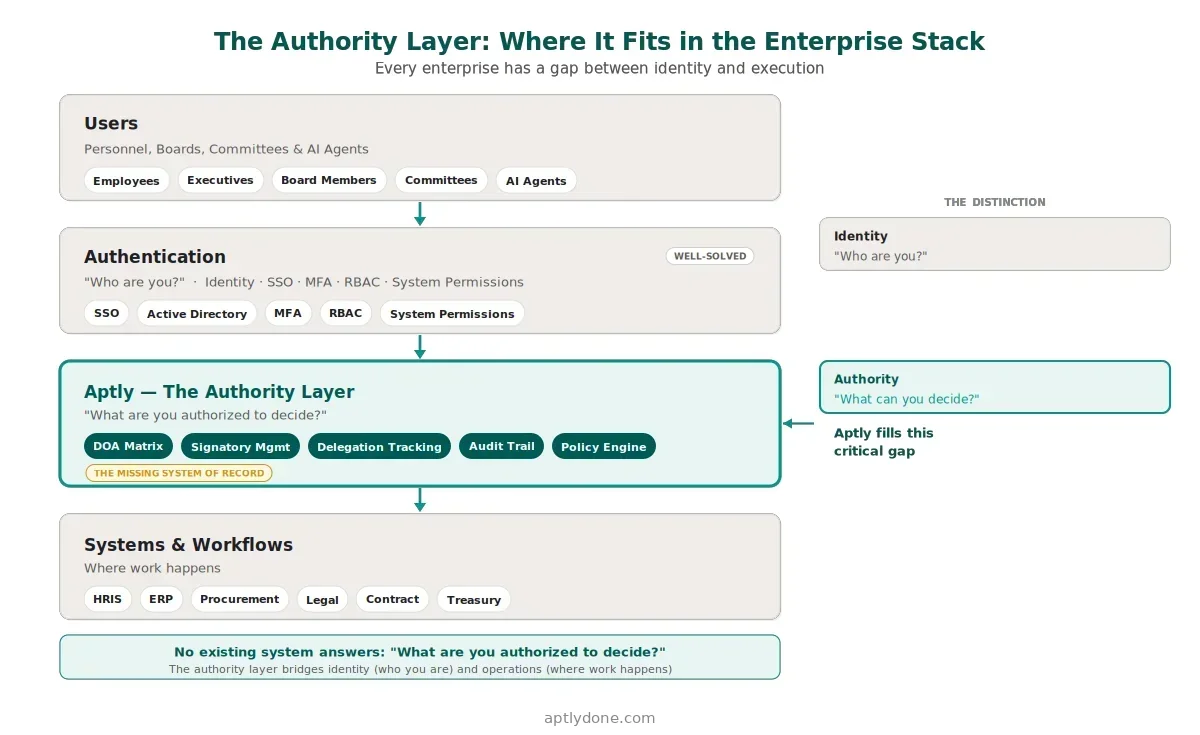
Purpose-built authority management platforms address these gaps by centralizing the matrix in a searchable, governed system of record; automating delegation issuance and expiry so temporary authority does not become permanent; integrating with HRIS, ERP, procurement, and identity systems so authority stays aligned with organizational reality; and maintaining complete audit trails with point-in-time recall for compliance evidence.
The global governance, risk, and compliance (GRC) market — valued at $62.92 billion in 2024 and projected to reach $134.96 billion by 2030 (Grand View Research) — reflects the growing recognition that governance infrastructure must be digital, integrated, and auditable. Organizations evaluating technology options should prioritize platforms that treat the authority matrix as a live system with controlled changes, versioning, and downstream enforcement — not as a digitized document.
Aptly is purpose-built for this use case. It centralizes authority matrices, tracks delegation issuance with full lineage, maintains audit-ready version history, and integrates with HRIS, ERP, and operational systems to keep authority aligned with how the organization actually operates.
Organizations building or rebuilding their DOA matrix should consider a dimension that did not exist even two years ago: authority for AI agents. Gartner predicts that 90 percent of B2B purchases will be AI-agent intermediated by 2028, channeling $15 trillion through autonomous exchanges. A SailPoint and Dimensional Research survey found that 98 percent of organizations plan to expand their use of AI agents — yet 96 percent of technology professionals consider them a growing security risk.
The governance challenge is straightforward: if an AI agent can initiate purchases, approve exceptions, or execute payments, it needs to be governed with the same rigor as any human actor. That means explicit delegation records, defined limits and conditions, time-bound authority, and full audit trails. The EU AI Act (Article 14) now requires human oversight and authority structures for high-risk AI systems, making this a regulatory requirement as well as a governance aspiration.
Organizations that build their DOA matrix with extensibility to non-human actors — using role-based authority that can apply to agents as well as people — will be better positioned for this transition. For a detailed framework, see Agentic Authority Management.
A delegation of authority matrix is a structured governance document that maps decision types and approval thresholds to the roles authorized to approve them. It defines who can commit the organization to financial and operational obligations, under what conditions and constraints, and with what evidence requirements. The matrix serves as the operational rulebook that translates high-level DOA policy into deterministic, day-to-day approval decisions.
Start with 6 to 10 high-impact decision types in your first version. Organizations that try to cover 50 or more decision types in the initial matrix typically stall in committee review. A focused matrix covering procurement, contracts, payments, and capital approvals addresses the majority of financial risk while remaining manageable. Expand to additional domains (HR, IT, risk acceptance) once the initial scope is adopted and operational.
A focused first-version matrix covering one decision domain can typically be designed and validated in four to six weeks, with another two to four weeks for system alignment and rollout. Enterprise-wide matrices covering multiple domains, entities, and regions commonly take three to six months. The key variable is organizational complexity and stakeholder alignment, not the matrix design itself.
Rarely. Thresholds should reflect local risk context, regulatory requirements, and business volume. A $50,000 contract threshold may be appropriate for a mature market subsidiary but too high for a smaller entity in an emerging market. The matrix should accommodate entity-level or regional variations within a consistent governance framework — maintaining the same decision types and authority principles while adjusting thresholds to local conditions.
Designing the matrix in isolation from the systems that enforce it. If your ERP, procurement, or contract management workflows do not reflect the matrix rules, you have a document that describes intent but does not control outcomes. Successful implementations align the matrix with workflow rules from day one, ensuring that the same authority logic governs both the governance artifact and the operational systems.
A DOA matrix defines who has the formal authority to approve or commit the organization, with specific thresholds and conditions. A RACI matrix clarifies who is Responsible, Accountable, Consulted, and Informed in a process — it assigns roles but does not grant decision rights. You can be "Accountable" in a RACI and still lack the delegated authority to approve a transaction above a given threshold. Most organizations need both frameworks, applied to their respective governance functions.
Effective programs use a mixed cadence: event-based updates triggered by role changes, re-orgs, or new entities; monthly reconciliation of key mismatches between the matrix and system enforcement; quarterly sampling to validate evidence; and annual recalibration of thresholds aligned with business strategy. The EY/Society for Corporate Governance study found that most organizations struggle with keeping authority current — a defined cadence with clear ownership is the most effective countermeasure.
The rules and enforcement can — and should — be automated where possible. Purpose-built authority management platforms centralize the matrix, automate delegation issuance and expiry, integrate with HRIS and workflow systems, and maintain audit-ready evidence. The governance decisions themselves — what thresholds to set, who to delegate authority to, how to balance speed with control — remain human judgments that the matrix operationalizes.
Multiple frameworks either explicitly require or strongly imply formal DOA structures. SOX Sections 302 and 404 (United States) require effective internal controls including authorization controls. The UK Corporate Governance Code Provision 29 requires boards to document delegated authorities. MiFID II (European Union) requires clear governance for financial services decision-making. The EU AI Act Article 14 requires human oversight and authority structures for high-risk AI systems. APRA CPS 510 (Australia) requires documented delegation frameworks for regulated financial institutions.
The policy establishes governance principles, ownership, scope, and the rules for how authority is managed across the organization. The matrix is the operational artifact that maps specific decision types, thresholds, and conditions to approver roles. The policy governs the matrix; the matrix operationalizes the policy. Both are necessary — a policy without a matrix is unenforceable, and a matrix without a policy lacks governance context.
Connect with our team for a discovery session to learn more about how Aptly can help within your organization. If you are already a client and need support, contact us here.