Q&A on how unauthorized signatures happen, the controls that actually prevent them, and how to design an auditable signature authority process.
For background on what authorized signatory lists are and why they go wrong, see Authorized Signatory Lists Explained.
Definition: An unauthorized signature is the execution of a binding instrument, such as a contract, banking instruction, or corporate resolution, by a person who did not have valid signing authority for that specific scope, entity, threshold, or time period.
Unauthorized signatures are rarely the result of a single bad actor. More often, they are the predictable outcome of outdated lists, unclear rules, and weak enforcement in the places where signatures happen. The ACFE 2024 Report to the Nations found that 51 percent of occupational fraud losses trace to either absent internal controls (32 percent) or management override of existing controls (19 percent). Signatory authority management is one of the most fundamental controls an organization can maintain, and when it breaks, the consequences are immediate and binding.
An unauthorized signature is any execution of a binding instrument by someone who lacked valid authority for that scope, entity, threshold, or time period at the moment of signing.
A: Four conditions define whether a signature is unauthorized. First, the signer may have authority for the wrong entity or bank account. Second, the transaction value may exceed their delegated limit. Third, a temporary authority may have expired without revocation. Fourth, a role change or termination may have revoked the authority without the signatory list being updated.
It is worth noting that unauthorized does not always mean fraudulent. In many cases the signer believed they had authority, or an emergency workaround became routine without anyone realizing the original delegation had lapsed. According to the ACFE, 87 percent of fraud perpetrators were first-time offenders with no prior fraud history, which means organizations cannot rely on background checks or past behavior alone to prevent unauthorized actions.
Most unauthorized signatures result from stale signatory lists, role churn that outpaces authority updates, emergency workarounds, unclear instrument scope, or disconnected systems.
A: The failure modes below represent the most common root causes. Each is preventable with the right controls, but most organizations still operate with manual processes that make every one of these scenarios more likely. Industry research on authorized signatory management consistently shows that the majority of organizations still manage signatory authority through spreadsheets and static documents, and that it often takes weeks to update signatory lists after a single personnel change.
The table below maps each failure mode to its root cause and the risk it creates.
Effective prevention requires layered controls spanning policy, issuance, validation, recertification, revocation, and audit evidence rather than relying on any single mechanism.
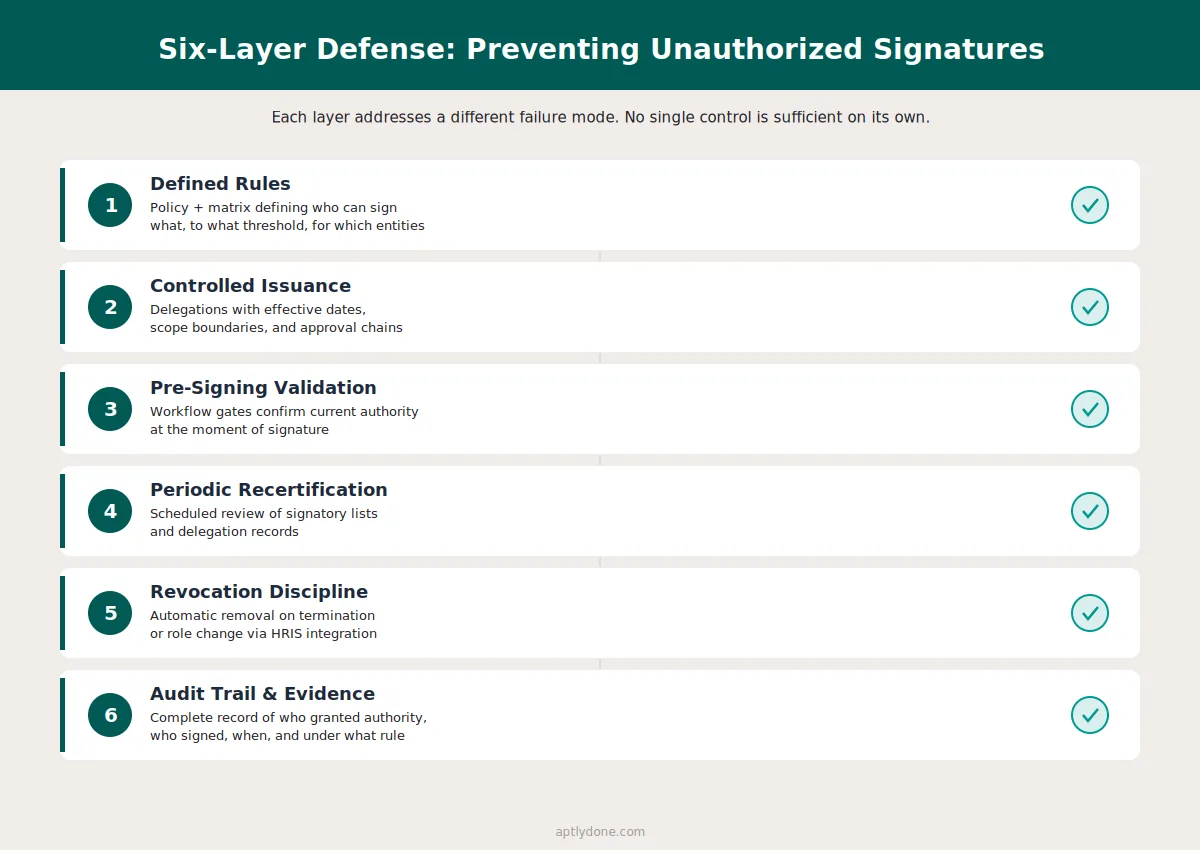
A: The strongest programs use six layers of defense:
Relying on training alone is not a control. A 2025 EY and Society for Corporate Governance study found that 36 percent of organizations cite training shortcomings as their top DOA challenge, and only 40 percent conduct regular training. Training helps build awareness, but it cannot catch edge cases or enforce rules at the moment of signing.
Our recommendation: The single most impactful control is connecting signatory list updates to HR role change events. When a termination or role change in HRIS automatically triggers a signatory review, the most common failure mode, stale authority, is eliminated at its source. For organizations that want to go further, integrating signatory management with delegation of authority records creates a closed-loop system where signing rights are always traceable to an active, current delegation.
Auditors evaluate whether the organization can demonstrate who had authority to sign, when that authority was granted, and whether it was valid at the time of execution.
A: Internal and external auditors focus on four areas when assessing signatory controls. First, they confirm that a documented policy exists defining which roles carry signing authority and for which instrument types. Second, they test whether the signatory list is current by comparing it against HR records and recent role changes. Third, they examine the approval chain to confirm that someone with appropriate oversight granted the authority. Fourth, they check whether the organization can reproduce the state of the signatory list as of any historical date, which is critical for SOX and internal controls compliance.
A Deloitte governance study recommends that financial services organizations adopt a three-lines-of-defense model, where business units own controls, risk and compliance functions monitor them, and internal audit provides independent assurance. Signatory authority is a natural fit for this model because the business issues delegations (first line), compliance or legal confirms they align with policy (second line), and audit validates the controls are working (third line).
E-signature tools verify identity and create evidence, but they do not confirm whether the signer held valid authority for the specific instrument, entity, or threshold.
A: E-signature platforms improve identity verification and produce tamper-evident evidence, but they do not automatically validate authority. Many organizations have e-signature workflows that still allow anyone with platform access to sign, especially when templates or routing rules are loosely configured. A signer can be positively identified through multi-factor authentication and still lack the delegated authority for the transaction they are executing.
E-signature is a necessary piece of the signing stack, but it must be paired with an authority validation layer. The EY/Society for Corporate Governance survey found that 65 percent of organizations combine their delegation of authority and signatory authority policies. For these organizations, the connection between who approved the decision and who is authorized to execute the signature should be seamless. When these records live in different systems, gaps emerge.
Temporary signing authority should be explicit, time-bound, scope-limited, and automatically reverted when the coverage period ends.
A: Temporary coverage scenarios (vacation, leave, interim appointments) require specific controls to prevent temporary authority from becoming permanent by accident. A well-structured temporary delegation includes a defined start and end date, scope limitations specifying the entity, instrument type, and monetary threshold, a recorded approval from the delegating authority, and automatic reversion with notifications when the period expires.
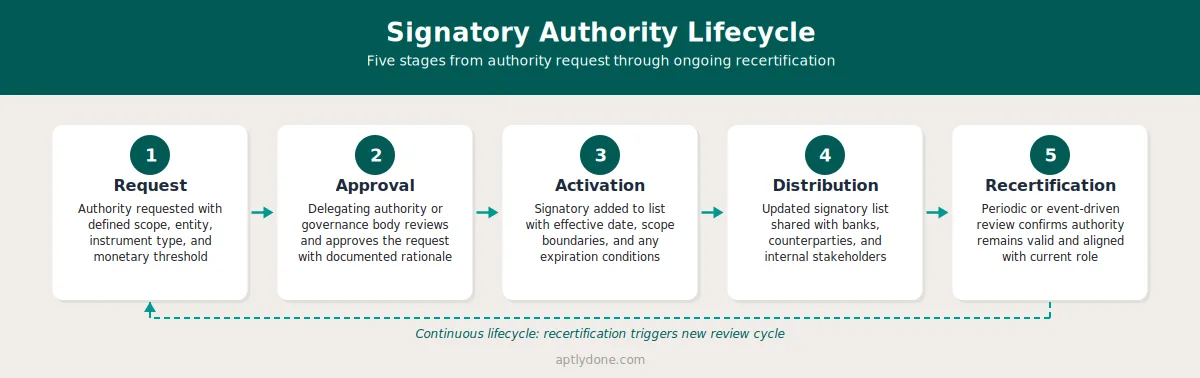
If temporary authority is granted via email without an expiration date, it will eventually become permanent by default. No one revisits the email, and the individual continues signing. This is one of the most common authority change management failures. Embedding temporary delegations in a system that enforces expiry dates eliminates this risk entirely.
The delegation of authority defines who can approve what and up to what limit, making it the policy foundation that determines who should appear on a signatory list.
A: A delegation of authority establishes the rules. An authorized signatory list operationalizes those rules by identifying the specific individuals who can execute binding instruments. When these two records are kept in sync, the organization can trace every signature back to a live, current delegation. When they drift apart, unauthorized signatures become inevitable.
The EY/Society for Corporate Governance study found that 90 percent of organizations maintain a DOA policy, but 35 percent report difficulty tracking and enforcing it. The enforcement gap is where unauthorized signatures most often occur. Having a policy is necessary but not sufficient. The policy must connect to the signatory list, and the signatory list must connect to current HR and role data.
A targeted recertification of signatories on high-risk instruments, including bank accounts and large contracts, is the fastest way to reduce immediate unauthorized signature exposure.
A: Do a targeted recertification: identify all current signatories for high-risk instruments (bank accounts, large contracts, corporate resolutions), confirm employment status and role alignment against current HR records, remove or time-bound any ambiguous cases, and document the recertification decision. Then publish the updated list to all counterparties, banks, and internal stakeholders who rely on it.
This does not replace a full signatory governance program, but it reduces immediate exposure where the consequences of an unauthorized signature are most severe. The AFP 2025 Payments Fraud and Control Survey found that 79 percent of organizations experienced actual or attempted payments fraud in 2024. For organizations in that majority, confirming that signatory lists are current on banking instruments is the single highest-impact step.
Aptly provides a governed system of record for signatory authority with controlled issuance, time-based delegations, HRIS-triggered revocations, and audit-ready history.
A: Aptly helps organizations treat signatory authority as governed data rather than static documents. Searchable signatory lists, controlled issuance and revocation workflows, time-based delegations with automatic expiry, and a complete audit trail make it possible to validate authority before signing and prove it after the fact. Integration with HR systems means that role changes and terminations automatically trigger signatory reviews, closing the gap that causes most unauthorized signatures.
For organizations managing authority across multiple entities, jurisdictions, and instrument types, Aptly connects delegation of authority records with signatory lists so that every signing right traces back to a current, active delegation. The result is a closed-loop system where the question Was this person authorized to sign always has a documented, auditable answer.
Even organizations that invest in signatory governance often make structural errors that undermine the controls they build. Recognizing these patterns helps teams design more resilient processes from the start.
Treating training as a substitute for system controls. Training builds awareness, but it cannot enforce rules at the moment of signature. An employee who completed compliance training last quarter may still sign a document outside their authority if no system check prevents it.
Maintaining separate signatory lists in multiple systems without synchronization. When the banking team, legal department, and procurement group each maintain their own version of who can sign, inconsistencies are inevitable. A single system of record, distributed to counterparties through controlled channels, eliminates version conflicts.
Granting temporary authority without automatic expiry. Email-based approvals for vacation coverage create a permanent record with no reversion mechanism. Six months later, the temporary signer still appears on the list because no one flagged the email for follow-up.
Relying on annual recertification alone. An annual review catches problems once a year at best. In organizations with 15 percent annual turnover, a yearly cycle means hundreds of role changes go unreviewed for months. Connecting recertification triggers to HR events (termination, transfer, promotion) catches changes in real time.
Confusing e-signature adoption with authority governance. Deploying an e-signature platform addresses identity verification and evidence, but it does not answer the question of whether the signer was authorized. These are complementary capabilities, not substitutes.
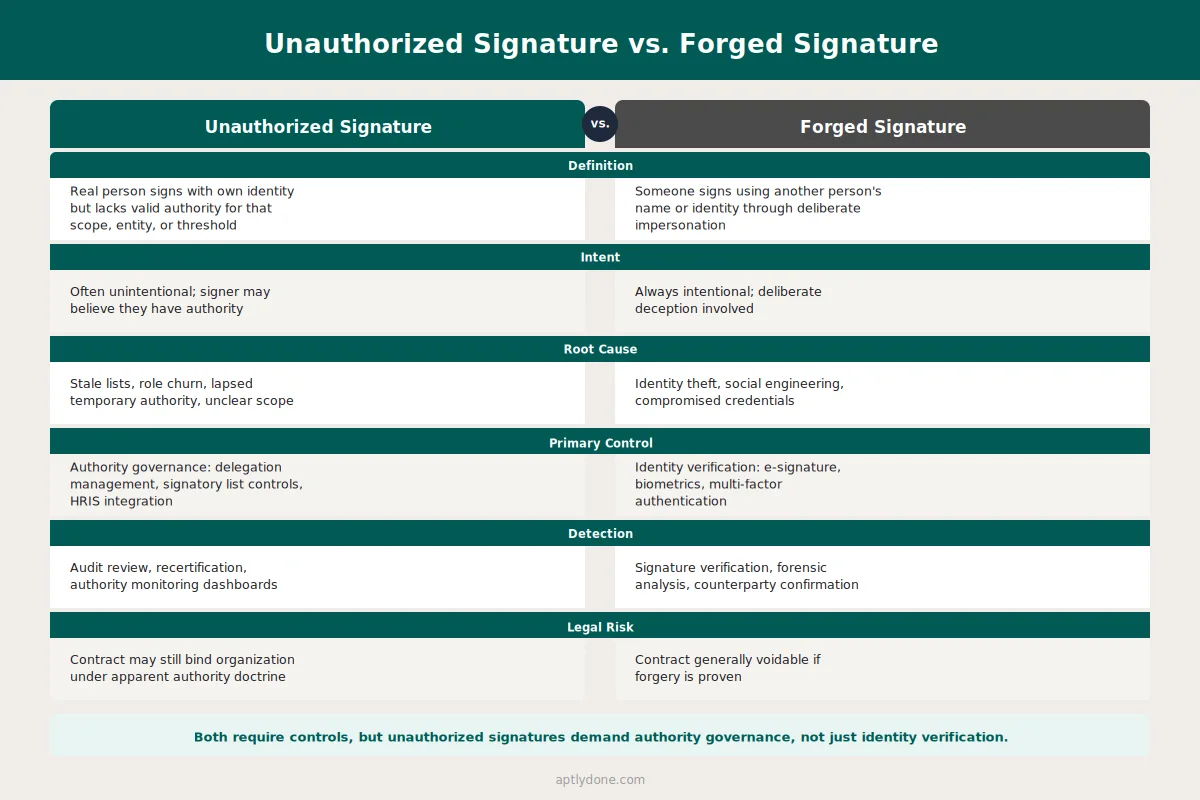
A forged signature involves deliberate impersonation, where someone signs using another person's name or identity. An unauthorized signature involves a real person signing with their own identity but without valid authority for that specific instrument, scope, or threshold. Both create legal and compliance risk, but they require different controls. Forgery is addressed through identity verification (e-signature, biometrics). Unauthorized signatures are addressed through authority governance (delegation management, signatory list controls).
Best practice is to combine event-driven reviews (triggered by HR role changes, terminations, and organizational restructures) with periodic recertification on a quarterly or semi-annual cycle. Event-driven reviews catch the most common failure mode in real time, while periodic reviews catch edge cases that event triggers may miss, such as gradual scope changes or dormant authorities.
Ownership typically sits with legal, corporate secretary, treasury, or a dedicated governance function, depending on the organization's structure. The EY/Society for Corporate Governance study found that legal leads DOA management in 73 percent of organizations. Regardless of where ownership sits, the process must include input from HR (for role changes), finance (for threshold alignment), and the business units that initiate signing requests.
It depends on the jurisdiction and circumstances. In many common law systems, an unauthorized signature may not bind the organization if the counterparty knew or should have known the signer lacked authority. However, if the organization created the appearance of authority (through published signatory lists, prior course of dealing, or failure to repudiate promptly), the contract may be enforceable under apparent authority doctrines. The legal uncertainty alone makes prevention far more reliable than remediation.
Approval authority (governed by the delegation of authority) determines who can make or approve a decision, such as committing to a contract or authorizing a payment. Signatory authority determines who can execute the binding instrument, physically or electronically signing the document that makes the commitment enforceable. In well-governed organizations, signatory authority flows from approval authority. The alignment between these two layers is a key governance control.
Immediately upon termination, the departing individual should be removed from all signatory lists and their authority status communicated to all counterparties, banks, and internal stakeholders who rely on those lists. If the organization relies on manual processes, this removal can take weeks, creating a window of vulnerability. HRIS-integrated signatory management eliminates this gap by triggering automatic reviews when a termination event is recorded.
Yes. Tiered monetary thresholds are a core control. A junior finance manager might have signing authority for invoices up to $10,000, while contracts above $500,000 require dual signatures from senior executives. Thresholds should align with the organization's delegation of authority policy and reflect the materiality assessments used for financial reporting.
Each legal entity should maintain its own signatory list scoped to that entity's instruments and accounts. A centralized system of record allows the parent organization to maintain visibility across all entities while respecting the legal boundaries that separate them. The authority monitoring and reporting function should include cross-entity dashboards that flag signatory gaps, expired delegations, and entities with incomplete coverage.
SOX Section 302 requires principal officers to certify the effectiveness of internal controls over financial reporting. Signatory authority is a key control over financial transactions and external commitments. If auditors find that unauthorized individuals can execute binding financial instruments, that weakness must be disclosed. For more detail on this connection, see the DOA and SOX/Internal Controls Q&A.
Connect with our team for a discovery session to learn more about how Aptly can help within your organization. If you are already a client and need support, contact us here.