Q&A on integration patterns, fail-closed design, and the most common embedding pitfall.
This article extends two foundational pieces in the operations cluster. Single Source of Truth for Authority Integrations covers where authority should live and Avoiding Sync Drift Between Authority Systems covers what to do when systems diverge. This article picks up at the next layer down: how authority gets enforced inside a workflow at the moment of action, with named integration patterns, attribute requirements, and failure-handling rules an auditor will accept.
Definition: An authority check inside a workflow is a real-time or near-real-time validation that confirms a specific person or role is authorized to approve or execute a specific action, against the matrix and delegations in force on the action's effective date, and that records the validation result as audit evidence at the time of the action.
Authority programs fail at this layer more than any other. The matrix can be perfect on paper, the delegations current, the policy signed by the audit committee, and yet a $250K purchase order can still be approved by someone who lost spend authority three weeks ago because the procurement system was checking a stale local table. Embedment is the last mile, and the last mile is where most failures happen.
An authority check answers one runtime question: does this person have authority to approve or execute this action right now? It evaluates decision type, threshold, entity, conditions, and effective date in a single pass.
The check is not a permissions test in the identity sense. Identity systems answer who are you? An authority check answers a different question: what can you decide? A user can be correctly authenticated, correctly assigned to a role in HR, and still lack authority for the transaction in front of them, because their delegation expired, their threshold dropped after a reorg, or the entity they are approving for is outside their scope.
A meaningful authority check evaluates five attributes simultaneously, against the matrix and delegation records in force on the action's effective date. It returns a deterministic answer (authorized, not authorized, or ambiguous) along with a structured trace that names the matrix version, the delegation chain, and the conditions evaluated. That trace is what makes the check useful as audit evidence months later.
Performance matters but less than people assume. Most workflow tools tolerate a 100 to 300 millisecond authority lookup without user-perceptible delay because the check fires inside a request that already involves database reads and policy evaluation. The constraint that bites in practice is not latency; it is availability, which is why the failure-handling design in section 7 matters as much as the check logic itself.
Embedment is the gap between policy and operation. Auditors find it broken because most organizations document authority centrally but enforce it locally in workflow tools that drift silently until a failure or audit surfaces it.
The keystone statistic for this layer comes from EY and the Society for Corporate Governance. Their January 2025 survey, The Delegation Edge, found that almost 90 percent of organizations maintain a delegation of authority policy, but only 14 percent embed that policy in a dedicated IT system. The remaining 76 percent keep the policy in spreadsheets and documents, replicate it as approval rules inside individual workflow tools, or both. That 76 percent gap is exactly where embedment failures originate, because there is no system of record for the workflow tools to validate against in real time.
The audit consequences are well-documented. The PCAOB's auditing standard for an audit of internal control, AS 2201, requires the auditor to obtain evidence that controls operated effectively throughout the period, not just that the policy existed. When a workflow tool's local approval rules diverge from the central matrix, every transaction processed during that divergence is exposed. Sarbanes-Oxley sections 302 and 404 compound the exposure: CEOs and CFOs personally certify the effectiveness of internal control over financial reporting, and "effective" is judged by operation, not intent.
Definition: Embedment drift is the gap that opens between an organization's centrally maintained authority records and the local approval rules configured inside individual workflow tools (procurement, treasury, contract lifecycle, ERP). The drift is usually invisible until a transaction fails or an audit sample surfaces it.
The fraud-detection literature reinforces the point. The Association of Certified Fraud Examiners' 2024 Report to the Nations found a median 12-month detection time and $145,000 median loss per occupational fraud case. Cases involving override of approval controls were systematically harder to detect because the audit trail looked clean inside each individual system, and only became visible when investigators reconstructed the matrix-and-delegation state as it should have been at the time of each transaction. That reconstruction work is what an embedded authority check does automatically.
The decision-quality cost is also material. McKinsey research on organizational decision-making found that 72 percent of senior executives said bad strategic decisions were either as common as good ones or the prevailing norm in their organizations, with the cause traced to clouded accountabilities and authority that fails to delegate cleanly. When workflow tools cannot answer who is authorized to decide this, the decision either stalls or routes to the wrong approver. Both outcomes show up in Authority Monitoring and Reporting Metrics.
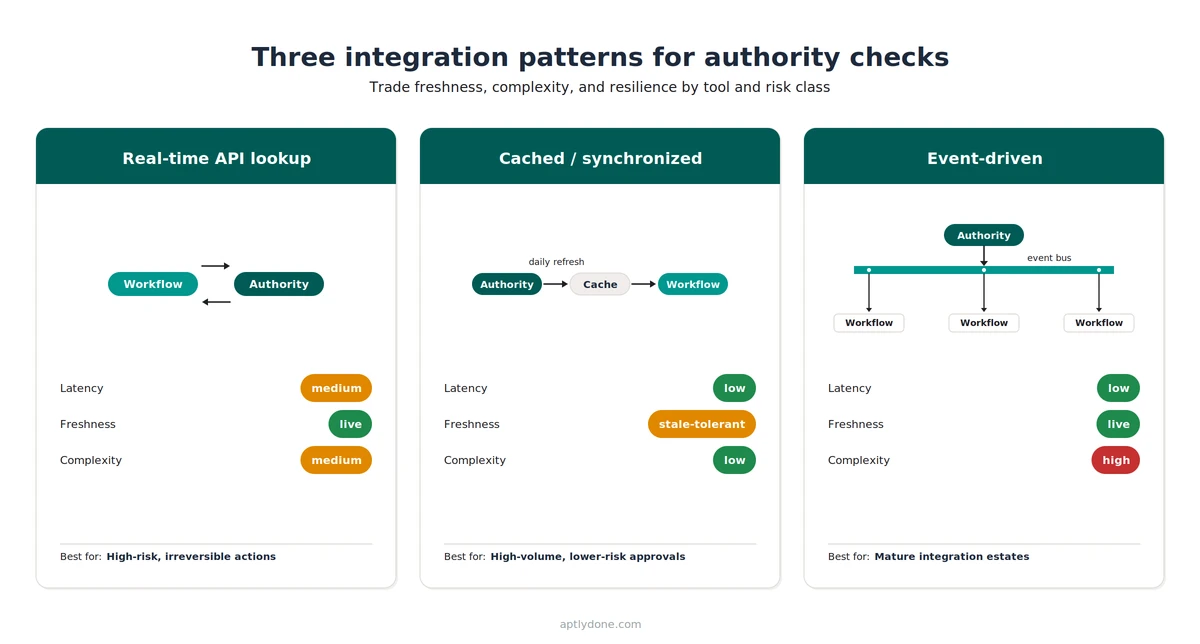
Three patterns dominate practical embedments: real-time API lookup, cached or synchronized export, and event-driven update propagation. Each trades freshness, complexity, and resilience differently. Most enterprises end up with a mix, not a single choice.
The choice between these patterns is rarely a clean architectural decision. Most enterprises end up running two or three concurrently because workflow tools have different integration surfaces, different transaction risks, and different appetites for added latency. The right question is not which pattern wins but which pattern fits this tool, for this risk class.
The behavioral dimension matters too. West Monroe's 2026 Speed Wins research, which surveyed 1,000 managers and 214 C-suite executives at U.S. companies with at least $250 million in revenue, found that 44 percent of C-suite leaders identify bureaucratic processes as the main cause of slow decisions. The right pattern reduces bureaucracy by validating authority instantly at the point of action. The wrong pattern adds a new approval layer the team works around. The pattern choice is therefore a question about whether embedment makes work faster or slower, not just a technical decision.
Definition: System of execution is the workflow tool that initiates and routes a business transaction (Coupa for procurement, Kyriba for treasury, DocuSign CLM or Ironclad for contracts, Workday for HR transactions). The system of execution is distinct from the system of record for authority, which is the central matrix-and-delegations source the execution system validates against.
The cached pattern is the most common starting point for organizations new to embedment, because most workflow tools already have a local approval-rule table that can be populated from an export. The trade-off is freshness: every cached export accepts a window during which the local rules can be wrong. For low-value, high-volume approvals, a daily refresh is usually adequate. For high-value or signature-bearing transactions, real-time API lookup is the correct default. Reconciliation cadence and drift-detection tooling are covered in Avoiding Sync Drift Between Authority Systems.
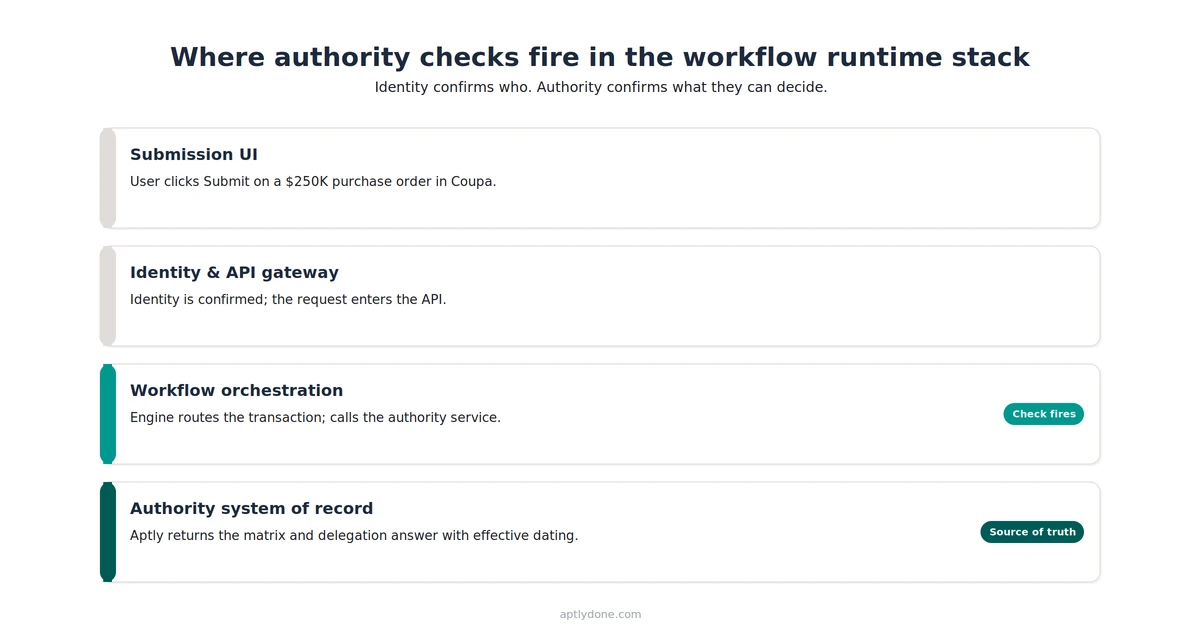
The check should fire at the orchestration layer, not the UI and not the system of record. Orchestration is where the workflow tool routes the transaction and owns the audit trail for that routing decision.
Workflows process transactions through four conceptual layers. The submission layer (a Coupa requisition form, an Ironclad contract upload) captures intent. The identity and API gateway layer authenticates the submitter and routes the request to backend services. The orchestration or execution layer is the workflow engine inside the tool: it routes through approval steps, applies business rules, and writes the audit trail. The system of record (Aptly, in this context) holds the authoritative matrix and delegation records.
The temptation is to place the check at the submission layer, because that is closest to the human action. The temptation is wrong. UI-layer checks can guide users (suggesting the correct approver, hiding fields they cannot edit), but they cannot enforce authority because anyone with API access can bypass them. Identity-layer checks confirm who the user is, but identity is not authority. The system-of-record layer holds the authoritative answer but does not see the transaction or own the workflow's audit trail. The orchestration layer is the only place where the transaction, the audit trail, and the authoritative answer can be joined into a single enforceable decision.
The orchestration-layer pattern also survives org changes. When a new approver replaces a departing one, when a delegation activates for vacation coverage, or when a threshold drops after a reorg, the central matrix updates and the orchestration layer's next call returns the new answer automatically. UI hints, identity roles, and local approval tables all need separate reconfiguration, and that timing is what produces the divergence covered in section 2.
Our recommendation: Place the authority check at the orchestration layer of every workflow tool that processes business-impacting transactions, and treat the system of record as the API the orchestration layer calls, not as a report the workflow team consults. Keep submission-layer hints for usability, but never depend on them for control.
For the architectural background on what counts as an authoritative source of authority truth, see Single Source of Truth for Authority Integrations.
Prioritize embedment by transaction risk and reversibility. Procurement, treasury, contract execution, master data, and any payment-routing tool come first. HRIS and lower-stakes approvals follow, and shadow-IT tools come last but should not be ignored.
The financial case for sequencing this way comes from West Monroe's Speed Wins research. The study found that 73 percent of C-suite leaders estimate that cutting decision-making time in half would generate between 5 and 25 percent additional revenue, and that 49 percent said their companies missed a major market opportunity in the past 12 months because internal decisions could not be made fast enough. The 73 percent is a leadership estimate of upside, not a guaranteed recovery. Realized upside depends on which workflows are slow.
The operational case comes from APQC's 2024 Delegation of Authority Policy research, which surveyed 311 finance professionals. APQC found that organizations with effective DOA practices report a 49 percent reduction in approval-process bottlenecks, alongside higher productivity and agility. The reduction comes from removing the manual lookup-and-confirm cycles that occur when a workflow tool cannot answer the authority question on its own.
The named tools in the table (Coupa, SAP Ariba, Kyriba, DocuSign CLM, Ironclad, Workday, NetSuite, SAP) are representative; the principle generalizes to any tool in each category. Contract lifecycle and e-signature platforms deserve a specific note: they are high-risk because a signed contract is legally binding the moment it is countersigned. The standalone view is in our signatory management guidance.
Master data deserves its own line. Updating a vendor bank account, a customer credit limit, or a chart-of-accounts entry bypasses most transactional approval gates. Master-data tools are often the last to receive embedment because they are not user-facing the way procurement is, yet they are frequently the first place fraud schemes target. The ACFE found that 51 percent of occupational fraud cases involve either lack of internal controls (32 percent) or override of existing controls (19 percent).
The sequencing logic is best operationalized inside the program-level structure described in Operating Model for Authority Management, which covers the ownership and cadence questions an embedment program needs to resolve before the technical work starts.
A meaningful check requires six attributes from the workflow: decision type, threshold, entity, conditions, effective date, and approver identity. Pass fewer and the check returns a partial answer auditors will discount.
The most common failure mode at this layer is sending an authority check with too little context. A workflow that asks can Jane Smith approve this? without specifying the decision type, the entity, or the threshold gets back a probabilistic answer, not a deterministic one. The downstream audit consequence is that the check does not stand on its own as control evidence; it has to be reconstructed from other sources, which is exactly what embedment is supposed to eliminate.
The hardest attribute to pass correctly is usually effective date. Most workflow tools default to the current timestamp when they make an authority call, but the relevant date is the date the transaction takes legal effect, which can be earlier (a backdated contract amendment), later (a future-dated purchase order), or contingent. When the workflow passes the wrong effective date, the authority service returns a structurally correct answer to the wrong question.
Definition: Effective dating is the practice of evaluating an authority check against the matrix and delegation records that were in force on the date the action takes legal effect, rather than the date the workflow tool processes the request. Effective dating is what allows authority records to change over time without invalidating prior decisions.
Conditions are the second-hardest attribute. Most matrices include rules that depend on deal structure (standard vs. non-standard terms, related-party vs. arm's-length, in-policy vs. out-of-policy). The workflow tool has to recognize when a non-default condition applies and pass the relevant flag. Tools that cannot inspect their own data deeply enough end up validating only against the default rule, which is the rule that needs validating least. The framework for which attributes belong on the matrix is covered in DOA vs. Approval Matrix vs. RACI.
One attribute pair deserves special handling: approver identity and delegation chain. The workflow knows which user clicked Approve, but the authority service has to resolve that user's authority by walking the delegation chain in force on the effective date. If Jane Smith is acting as a delegate for the CFO who is on vacation, the check has to validate the chain, not the user in isolation. Most authority programs see delegations active in roughly 10 to 20 percent of approvals on any given day.
Fail-closed blocks a transaction when the authority check is ambiguous; fail-open lets it proceed and logs the bypass. Default to fail-closed for irreversible actions, fail-open with logging for low-risk steps, and soft-stop in between.
Definition: Fail-closed is the design choice in which a workflow stops a transaction when its authority check returns an ambiguous result or fails to complete (timeout, partial data, system unavailable). Fail-open is the opposite choice: allow the transaction to continue and log the exception for later review. The choice is a control posture, not a technical preference.
The right answer differs by transaction class, and most enterprises run all three modes simultaneously. Blanket fail-closed is impractical because it blocks operational work during outages, but the default should bias toward fail-closed. The right design segments transactions into risk classes and applies the appropriate mode to each.
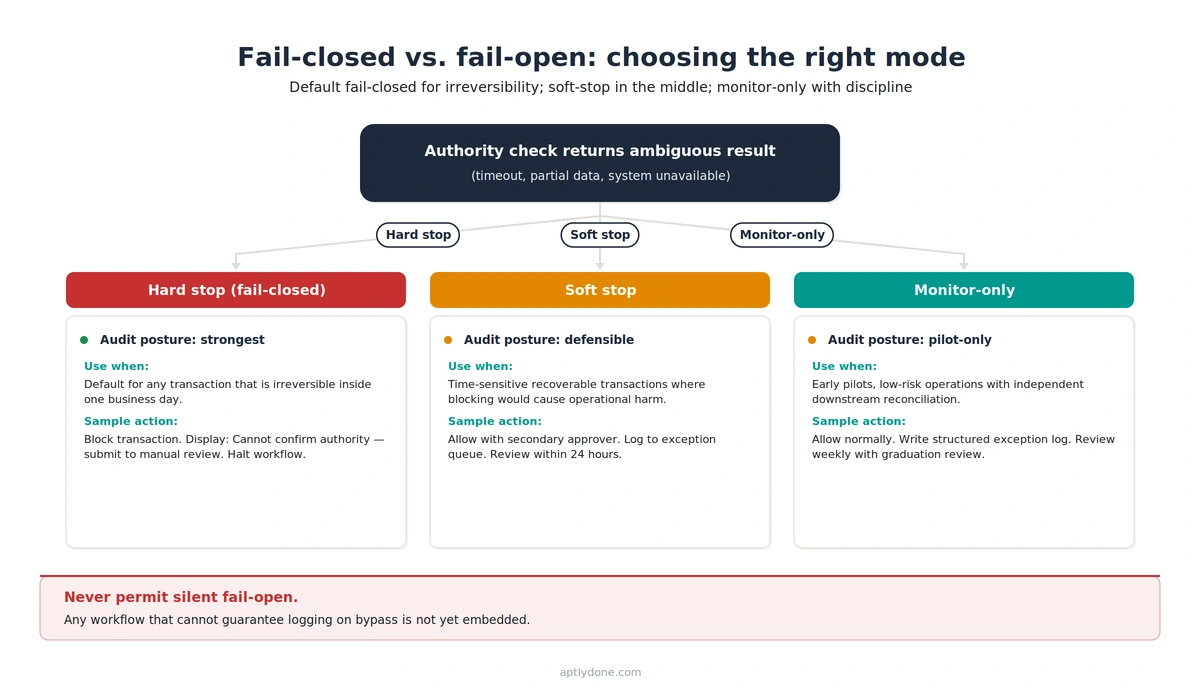
The audit posture differs sharply across the three modes. Fail-closed produces the cleanest evidence: the workflow either completed the check or did not complete the transaction. Fail-open with logging produces evidence that the transaction completed without a current authority answer, which is acceptable for low-risk classes but requires a robust review-and-resolve loop. Soft-stop produces the most complex evidence trail: the transaction completed, a secondary control compensated, and both events have to tie back to the original ambiguity.
One specific failure mode warrants flagging: silent fail-open. This occurs when an authority check times out, the workflow tool catches the timeout, and the exception handler defaults to allowing the transaction without logging the bypass. The transaction completes, no one is notified, and there is no audit evidence the check ever fired. Silent fail-open is rarely intentional; it is usually an artifact of generic error-handling code written before the authority integration existed. Auditors find it the same way they find sync drift: by reconstructing the authority state at the time of each transaction and discovering some transactions cleared without a corresponding check log. The detection methodology is covered in Avoiding Sync Drift.
Our recommendation: Default to fail-closed for any transaction that is irreversible inside one business day (payments, signed contracts, master-data changes). Use soft-stop for time-sensitive recoverable transactions where blocking would cause operational harm. Use fail-open with logging only for transactions that have an independent reconciliation downstream. Never permit silent fail-open under any circumstance; treat any workflow that cannot guarantee logging on bypass as not-yet-embedded.
The change-control process for moving a workflow between modes is covered in the Authority Change Management Playbook.
The most common mistake is validating the approval but not the approver's authority. The workflow records that the manager approved, without proving the manager had authority for that amount, type, and entity on that date.
This failure mode is endemic. Most workflow tools have a built-in concept of "approval recorded," and most teams treat the existence of an approval record as sufficient evidence. It is not. The audit-relevant evidence is a four-part claim: the named user approved, the approval was within their authority for that decision type, the threshold and entity matched the matrix in force on the effective date, and any conditions or delegations were validated. Tools that record only the first part produce evidence auditors discount.
The pattern manifests in three sub-failures, each warranting separate countermeasures. The first is the approver-identity-only check: the workflow confirms Jane Smith approved, but does not call back to the matrix to confirm Jane's threshold covered the transaction. The second is the missing-effective-date check: the workflow validates Jane's authority as of today, not as of the transaction's legal effective date, so a recent delegation expiry or threshold change is invisible. The third is the conditions-not-evaluated check: the workflow treats every transaction as a default-rule case and never evaluates the non-standard-terms or related-party flags that should trigger a different authority path.
The competitive cost of this pattern is concrete. West Monroe's Speed Wins research found that 56 percent of organizations say competitors beat them to market frequently or occasionally because of internal decision delays. The delay is rarely caused by the absence of authority; it is caused by uncertainty about whether the recorded approval will survive scrutiny. Teams add manual lookup-and-confirm steps to compensate, and those manual steps are exactly what embedment is supposed to remove. The 14 percent of organizations that embed authority in a dedicated IT system are also the organizations not paying that time tax on every transaction.
Our recommendation: Treat every authority check as a four-part validation: identity, threshold, conditions, effective date. Configure your workflow tools to fail or escalate when any of the four cannot be evaluated, and treat the resulting exception queue as a leading indicator of integration health, not a backlog of edge cases. The instrumentation needed is covered in Authority Monitoring and Reporting Metrics.
The accountability question behind these failure modes (who owns it when embedment is incomplete) is treated separately in Human Accountability in Agentic Workflows, and in Agentic Authority Management for the AI-specific case.
Aptly provides the system-of-record half of the embedment pattern. Workflow tools call Aptly to validate authority in real time, and Aptly returns a deterministic, source-traced answer with effective dating, condition evaluation, and full delegation-chain resolution.
Four product pillars are directly relevant to embedment. The Decisions Register holds the authoritative matrix: every decision type, threshold, condition, and entity-scope rule the organization recognizes. The Delegations Register holds the active delegation chain. The Conditions and Roles pillar holds the deal-structure rules that distinguish standard from non-standard terms. The Pathway View renders the live authority answer for any combination of decision type, value, entity, conditions, and effective date.
From an integration perspective, the Pathway View is the answer surface that workflow tools call. A procurement tool processing a $250K Coupa requisition sends the decision type, threshold, entity, conditions, effective date, and proposed approver to Aptly's authority API. Aptly resolves the matrix version in force on that effective date, walks the delegation chain, evaluates the conditions, and returns a deterministic answer plus the structured trace. The trace becomes the audit evidence for that transaction, and effective dating preserves it even if the matrix changes a week later.
The operational outcome aligns with the APQC findings cited earlier. Organizations with effective DOA practices reported 62 percent higher productivity in their finance functions, and the gain came largely from removing the manual lookup-and-confirm cycles that pre-embedment workflows accumulate. Embedment makes those cycles unnecessary because the authority answer is part of the transaction itself.
For the broader architectural picture, see Aptly's Authority Hub. For the foundational concepts, see Delegation of Authority 101.
Synchronous is the correct default for any check that gates a transaction the user is waiting on, because asynchronous validation creates a window during which the transaction has progressed without an authority answer. Asynchronous patterns suit backstop checks that run in parallel to a synchronous primary, or low-risk batch operations where the entire batch is reviewed before commit. Mixing patterns intentionally is fine; mixing them by accident is how silent fail-open emerges.
Delegations and proxies have to be resolved at the authority service, not at the workflow tool. The workflow passes the user who clicked Approve, and the authority service walks the delegation chain in force on the effective date to determine the principal whose authority is being exercised. Building chain-walking logic into individual workflow tools is a recipe for divergence: tools implement it differently, and the differences stay invisible until an audit surfaces them. The accountability framing is in Human Accountability in Agentic Workflows.
The right cadence is the cadence at which the authority records can change. For most enterprises that means daily for routine refresh, with event-triggered refresh for any change to a delegation, threshold, or matrix version. Pure schedule-based refresh without event triggers will drift, because authority records change in response to business events that do not align with a fixed schedule. The mechanics of detecting and recovering from drift are covered in Avoiding Sync Drift.
Every authority check should produce a structured log entry containing the matrix version evaluated, the delegation chain walked, the conditions checked, the effective date used, the user passed, and the deterministic answer returned. The log should be tamper-evident and retained for the audit retention period (typically seven years for SOX-relevant data). The instrumentation patterns are detailed in Authority Monitoring and Reporting Metrics.
A mix is almost always the right answer, because workflow tools differ in their integration surfaces and their tolerance for latency. Treasury and signature-bearing tools justify real-time API lookup. High-volume, low-risk procurement may run on a cached pattern with daily refresh. Master-data tools may use event-driven updates so a change to a vendor-bank-account rule propagates to every downstream consumer immediately. Forcing a single pattern across the portfolio almost always produces compromises that hurt the most important integrations the most.
The authority service evaluates against the effective date the workflow passes, which is usually the date the transaction was initiated rather than the date the approver clicks Approve. A change made during the approval window does not retroactively invalidate an in-progress transaction. The exception is when the workflow design intentionally re-evaluates at the moment of approval, which signature-bearing transactions sometimes do for safety. The choice between effective-at-initiation and effective-at-approval should be explicit and documented per workflow tool.
Run the integration in monitor-only mode against production transactions before switching to enforcement. The authority service receives the same calls the live workflow generates and returns its answers, but the workflow ignores them for routing. Compare the authority service's answers against the actual workflow outcomes for a defined period, typically 30 days. Discrepancies surface integration bugs, attribute-passing errors, and edge cases the matrix did not anticipate. Switch to enforcement only after the discrepancy rate drops below an agreed threshold. The same staged graduation pattern is recommended for any control mode change in the Authority Change Management Playbook.
Connect with our team for a discovery session to learn more about how Aptly can help within your organization. If you are already a client and need support, contact us here.